A SCRIPT FOR DAVINCI RESOLVE STUDIO · MAC & WINDOWS
Blur everyone.
Except you.
あなた以外、全員モザイク。
FaceMosaic learns your face once, then mosaics every stranger across your whole shoot. It runs on your own computer, straight from Resolve's Scripts menu.
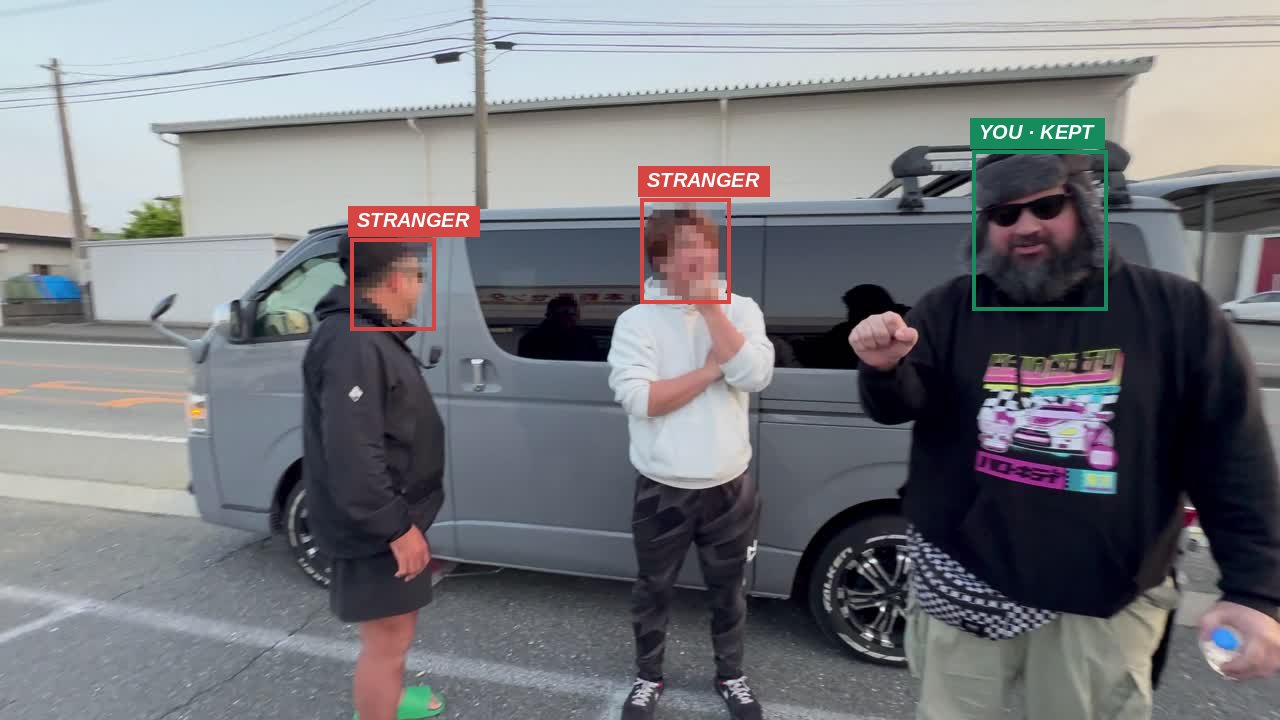
Masking faces by hand eats your editing time.
Film in public in Japan and strangers end up in every shot. Tracking each face with a mask, clip after clip, can take longer than the edit itself. FaceMosaic does that pass for your whole shoot in one run, and you just review it.
HOW IT WORKS
Three steps, all inside Resolve.
-
01
Teach it your face
Select a selfie clip and add yourself. FaceMosaic saves about 25 face photos. Add your crew or family the same way.
-
02
Select clips, tick who stays
Select clips in the Media Pool, or a whole bin. Tick the people to keep visible and press Start. Keep editing while it works.
-
03
Import and review
Mosaic copies land in their own bin, or swap straight into your timeline. Markers point you to the few spots worth a second look.
FEATURES
Built for people who film in public.
Your whole shoot in one run
Dozens of clips are batch-processed back to back. Finished clips are kept if you stop and restart.
Keeps you and your crew
Face recognition keeps enrolled people clear across the clip, even as they move or turn.
Nothing leaves your computer
Detection and recognition run fully offline. Your footage and face photos are never uploaded.
Review markers
Red marks a face left visible on a borderline match. Yellow marks a face that might be mosaicked by mistake.
Edit-ready files
Original audio, timecode and length are kept, and iPhone HLG color carries through. Export as ProRes, HEVC or H.264.
Ignores hands, wheels and look-alikes
Every large "face" is double-checked at several sizes, so hands, tires, engines and jackets don't get a mosaic by mistake.
You have the final say
Drop a marker named Keep on any mosaic you want gone and run it again. Re-renders skip the face search, so they're quick.
Classic TV-style mosaic
Coarse blocks that follow each face, padded to cover hair and forehead, in the look Japanese viewers expect.
DEMO
See it on real footage.
An honest note
No face detector catches everything. Faces in sharp profile, tiny faces far in the background and heavy motion blur can slip through. FaceMosaic mosaics any face it can't confidently match and marks borderline spots for you, but always scrub through your video before you publish.
FREE TRIAL
Try it on your own footage first.
The trial is the full app. Every feature works, with no time limit. The only difference: videos get a small “FaceMosaic TRIAL” mark in the corner. Buy a key when you’re happy, and FaceMosaic re-renders clean versions.
- Unzip and double-click install.command (Mac) or install.bat (Windows).
- Restart DaVinci Resolve Studio.
- Workspace → Scripts → FaceMosaic - Process Selected Clips, then click Try free.
ONE-TIME PURCHASE
¥5,980
License for 2 computers, Mac or Windows. Move it to a new one any time. No subscription.
Buy FaceMosaicSecure checkout by Stripe. Your license key appears right after payment, with the download link.
Requirements
- DaVinci Resolve Studio (tested on version 21)
- A Mac with Intel or Apple silicon
- Windows 10 or 11, 64-bit (beta)
- About 300 MB of disk space, plus room for the output files
FAQ
Questions
Is there a free trial?
Yes. Download it above and use every feature for free. Trial videos carry a small “FaceMosaic TRIAL” mark. After you buy, enter your key and run the clips again for clean versions.
Is my footage uploaded anywhere?
No. Everything runs on your own computer. Face photos stay in a folder in your home directory, and you can delete them any time.
How long does it take?
On a test Intel Mac, 4K iPhone footage took roughly five to six times the clip's length. Speed depends on your computer, the resolution and how many faces are in the shot.
Can I keep more than one person visible?
Yes. Enroll each person once, then tick whoever should stay visible for that batch.
Does it change my original clips?
Never. It writes new mosaic copies next to your originals, and you choose whether they replace the originals in your timeline.
Does it work with the free version of Resolve?
FaceMosaic is built and tested for DaVinci Resolve Studio. The free version isn't supported.
I lost my license key, or need to move it
To move it, open Workspace › Scripts › FaceMosaic - License on the old computer and click Deactivate, then activate on the new one. Lost the key? Contact us with your purchase email.